The short answer: two-factor authentication after death is the second lock on the door. Your family can hold the correct password and still be refused, because the account also wants a code, and the code goes to a phone nobody can unlock. If you are dealing with this right now, skip to where the codes actually go, because the answer depends entirely on which second factor was switched on.
This is not a fringe scenario, and estate attorneys have started saying so out loud:
“Having your passwords written down feels like being prepared. However, being accessible is a different thing entirely. Two-factor authentication has become standard across financial accounts, email, and cloud storage, which means most families now hit a second wall after a death: the verification code. It goes to a phone that’s locked or a number that no longer works, and the correct password gets them nowhere.”
Tom Misteli, Managing Attorney, Misteli Law Firm, Estate Planning and Administration. LinkedIn, July 7, 2026.
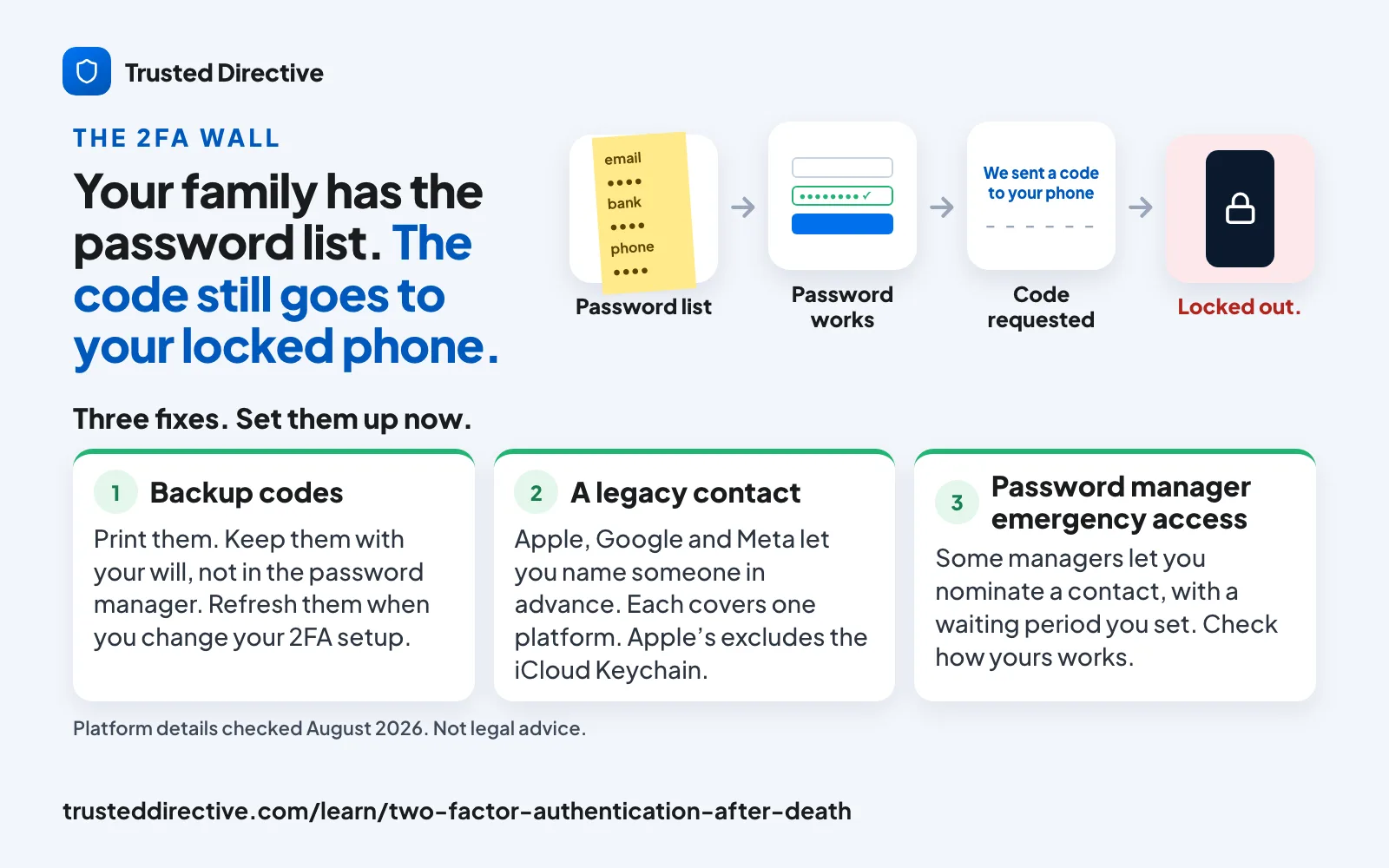
What two-factor authentication does after a death
Two-factor authentication asks for something you know, the password, plus something you have, usually a device. After a death the first factor is inheritable, because a password is just information that can be written down and handed on. The second factor usually is not, because it is tied to a physical object or a phone number rather than to knowledge.
That asymmetry is the whole problem. Your family can do everything right, hold a current and accurate password, and still be stopped at a screen asking for six digits that are being delivered to a handset sitting in an evidence bag, a drawer, or a carrier account that was cancelled the week after the funeral.
It gets worse in one specific and common case: when the locked phone is also the only enrolled factor. Recovering most accounts means proving control of the second factor, and the standard fallback is a recovery email, which is frequently protected by the same phone. A single locked device can therefore gate an entire financial life, and no amount of documentation your family holds changes that.
Why the password list is not the answer it used to be
If you have written your passwords down somewhere safe, you did what you were told, and for roughly two decades it worked. The advice did not become wrong because people got careless. It became wrong because the platforms changed underneath it, and the advice was never updated.
“A notebook full of passwords used to be enough. Today, it can leave your family completely locked out. Two-factor authentication, outdated recovery emails, and inaccessible devices are creating a growing gap in estate planning, one most families don’t discover until it’s too late. Even with the right legal authority, access can fail at the verification step.”
The Meneses Law Firm, a Massachusetts estate planning practice. LinkedIn, July 21, 2026.
Read that last sentence twice, because it is the part that catches families who did everything properly. Even with the right legal authority, access can fail at the verification step. Being the lawful executor and being able to log in are two different problems, and the paperwork solves only the first one.
What a well-drafted estate plan does not cover
A good estate plan is not the same thing as access, and the attorneys drafting those plans are the ones pointing it out.
“A well-drafted estate plan handles your financial accounts, your real property, and your personal belongings. It does not automatically give your family access to your email, your phone, your social media accounts, or the password manager where half your financial life now lives.”
Jenna Glassock, California Trusts & Estates Attorney. LinkedIn, July 29, 2026.
A will directs who receives what. It does not hand over credentials, and in most cases it should not, because a will can become a public record in probate. So the plan and the access have to be solved separately, by design, and the second one rarely gets solved at all.
Where the codes actually go
“Turn off 2FA” is not an option and would be terrible advice anyway. The practical question is narrower: for each important account, which second factor is switched on, and can anyone but you reach it? The answer differs sharply by method.
| Second factor | Where the code goes | Can your family reach it? |
|---|---|---|
| SMS text message | The phone number, which belongs to the carrier account. | Sometimes, and this is the most recoverable case. Whoever controls the carrier account can often move the number. If the plan is cancelled, the number is usually gone for good. |
| Authenticator app | Generated on the device itself. Nothing is sent, so there is nothing to intercept or forward. | Only with the unlocked phone, or the original setup QR codes and recovery codes, which almost nobody keeps. |
| Hardware security key | The physical key, in a pocket, drawer, or keyring. | Yes, if they find it and know what it is. Most people do not recognise one on sight. |
| Backup or recovery codes | Issued once, at setup, as a one-time list you were told to print. | Yes, and this is the cleanest path. It requires that you actually printed them and put them somewhere findable. |
| Email to a recovery address | Another inbox, often on the same phone. | Usually not, because the recovery inbox tends to be protected by the same locked device. This is the loop that traps most families. |
What partly works today
Several partial answers exist. Every one of them is worth setting up and not one of them closes the gap on its own, so the honest framing is a layered set of partial fixes rather than a solution.
Platform legacy tools. Apple, Google, and Meta each let you nominate someone in advance. They are free and they help, within one platform. It is worth knowing exactly where they stop: Apple’s Legacy Contact excludes your iCloud Keychain, which Apple describes as holding your payment information, passwords, and passkeys. So the single most relevant platform tool, on the platform most likely to hold your credentials, documents that it does not hand over the credentials.
Password-manager emergency access. Some managers offer a nominated contact with a waiting period. Bitwarden’s Emergency Access is the clearest published example: you nominate a trusted contact, you set the wait time yourself, and if you do not reject the request within it, access unlocks. Two practical caveats that rarely get mentioned. It is a paid feature rather than a free one. And its higher tier, takeover, works by replacing your master password and removing the two-step login you had configured, which is powerful and worth understanding before you rely on it.
Printed backup codes, stored with the will. Unglamorous and the most reliable item on this list, because it does not depend on a device, a carrier, or a vendor staying in business. The failure mode is that the codes go stale when you re-enroll an account, so they need a refresh whenever you change your 2FA setup.
Carrier account access. Underrated. Whoever can administer the mobile account can often keep the number alive, and the number is the key to a surprising share of SMS-based recovery. Cancelling the phone plan is one of the first things families do, and one of the more expensive.
Apple exclusion checked August 4, 2026 at support.apple.com/en-us/102631. Bitwarden Emergency Access mechanics checked August 4, 2026 at bitwarden.com/help/emergency-access. Other password managers implement this differently; check your own vendor’s documentation rather than assuming the same behavior.
What to do this week
Three things, in this order. None of them takes an afternoon.
- Find your five most consequential accounts and write down which second factor each one uses. Primary email first, because it is the recovery path for everything else. You are producing a map of second factors, not a password list.
- Generate and print the backup codes for those five. Put the printout with your will, not in the password manager, because a code stored behind the lock it is meant to open is not a backup.
- Write down who can reach the phone and the carrier account. The device passcode and who administers the mobile plan matter more than any individual password, and neither is usually recorded anywhere.
This page describes how platform and vendor mechanisms behave, and it is not legal advice. Whether a particular person may lawfully access a particular account after a death depends on state law, the provider’s terms, and facts we cannot see from here. Ask an estate attorney licensed where you live.
Where this fits
The 2FA wall is the mechanism. The larger problem it belongs to is that nothing happens automatically to your accounts when you die, and the accounts nobody knows about are never reached at all, whatever the authentication on them.
Two documents solve different halves. A death binder records what exists and where the codes live, and its known weakness is that it cannot travel to an emergency: it works only if the right person can physically reach it in time. The estate planning checklist covers the legal instruments that grant authority, which as the attorneys above point out is a separate thing from access.
Closing the gap between those two is what Trusted Directive was built for. Your documents and account inventory live in one secure vault today; Gap Discovery alerts for the pieces still missing, and the Verify-Silence Release Protocol that hands the right documents to the right person if you go silent when it matters, for incapacity as well as death, are in development for alpha.