The short answer: when you die, no central switch flips. Each bank, provider, and platform follows its own process — and only for the accounts your family knows to contact. Everything else keeps running, keeps billing, or sits frozen until someone finds it. What happens next depends almost entirely on what you set up while you were alive.
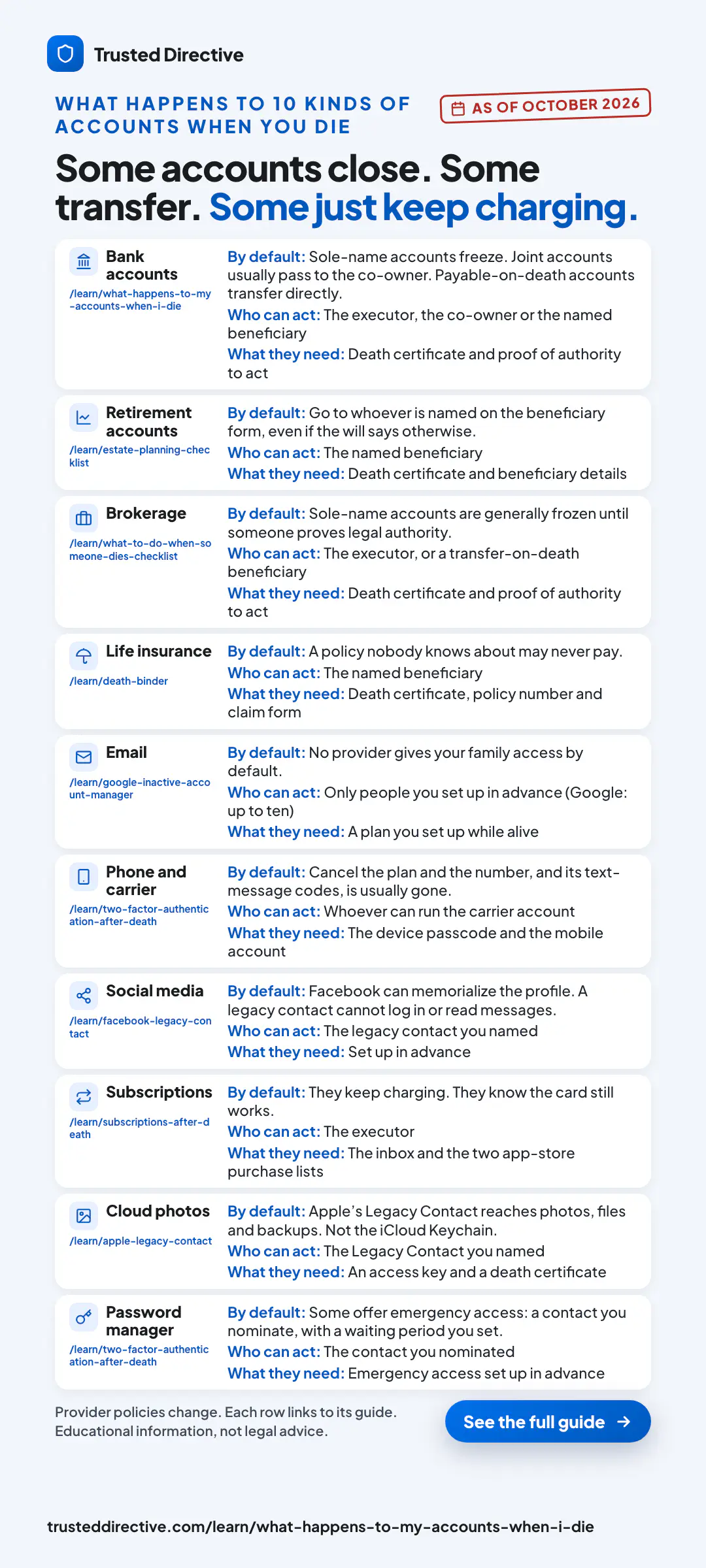
What happens to my bank accounts when I die?
Accounts in your sole name are frozen once the bank learns of your death, then pass through your will and probate. Joint accounts usually pass to the co-owner, and accounts with a payable-on-death beneficiary transfer directly. But a bank can only freeze — or release — an account someone knows exists.
That last clause is where estates actually break down. Your executor doesn’t get a master list of your accounts from anywhere. They reconstruct your financial life by hand: old tax returns, whatever mail still arrives, statements they can find, guesses about where you banked. An account they never find is an account nobody claims.
Unclaimed accounts don’t vanish — after a dormancy period they’re turned over to state unclaimed-property programs, where they wait for a family member to think to search. Some are recovered years later. Some never are.
What happens to my email, photos, and social accounts?
Each provider has its own policy, and none of them default to giving your family access. Google offers an Inactive Account Manager, Apple offers a Legacy Contact, and Facebook offers memorialization — all useful, all things you must set up in advance, and all limited to that one platform.
The limits matter. Apple’s Legacy Contact, for example, does not include the passwords saved in your iCloud Keychain. And no platform tool reaches across institutions: Google can’t tell your family about your brokerage account, and Apple can’t point them to your life insurance policy. Platform legacy tools answer “what happens to this account” — nobody’s tool answers “what accounts are there?”
There is a legal framework underneath all of this: most U.S. states have adopted RUFADAA, a law that decides who may access a person’s digital accounts after death or incapacity. In plain English, it gives top priority to the directions you leave through an online tool — ahead of a provider’s generic terms of service. That recognition applies to the documents and records stored in your Trusted Directive vault — not a blanket authority over every third-party account you hold. Leaving explicit directions is the difference between your family asking and your family waiting. Trusted Directive is built as exactly that kind of online tool.
What happens to subscriptions and autopay?
They keep charging. Streaming services, cloud storage, memberships, and insurance premiums on autopay don’t know you died — they know your card still works. Executors typically find them the slow way: watching statements for months and cancelling charges one by one. There is a faster path, and it is covered in what happens to subscriptions when you die: the inbox and the two app-store registries beat the statement review.
Autopay cuts the other way, too. A life insurance premium quietly paying itself is a policy your family may not know to claim; a policy that lapses because the funding account was frozen is worse. In settlements with state regulators, major life insurers agreed to pay $7.4 billion in unclaimed benefits on policies where the insured had died but no one had filed a claim (NerdWallet for USA TODAY, 2016).
Why paperless billing makes an estate invisible
A generation ago, the mailbox did the discovery work: statements, premium notices, and dividend checks arrived addressed to the person who died, and an executor who watched the mail for ninety days ended up with a map of the estate. Paperless billing ended that. Now nothing arrives.
Today the same estate exists as logins nobody has and inboxes nobody can open. The notices still go out — into an email account the provider just locked. This is the quiet structural change underneath every “we’re still finding accounts” story families tell: the paperwork didn’t get worse, the paper trail disappeared. Even genuinely organized people leave a scavenger hunt, because being organized in a filing cabinet doesn’t reveal the accounts that never printed anything.
Can’t my family just use my passwords?
Often they can’t, and technically they usually shouldn’t. Logging into a dead person’s account generally violates the provider’s terms of service, two-factor codes go to a phone nobody can unlock, and in some states unauthorized access laws apply even to well-meaning spouses.
Even when a password list works, it answers the wrong question. A password gets your family into an account they already know about — it doesn’t tell them which accounts exist, which policies are active, or where the will, deed, and power of attorney live. If you use a password manager, its emergency-access feature is worth setting up for the credentials themselves. The estate is the other half: the legal documents and the inventory of what’s out there.
This is a plain-English overview, not legal advice — probate and digital-asset rules vary by state. For your situation, ask your estate attorney.
What each platform’s legacy tool cannot reach
Apple, Google, and Meta have each built a legacy tool, and each tool documents a hole. Apple’s Legacy Contact hands over photos and files but not the iCloud Keychain, which is where the saved passwords sit. Google’s Inactive Account Manager releases nothing at all unless you set the plan up while you were alive. Meta’s legacy contact can tend a memorialized profile but cannot log into it or read the messages inside.
| Platform | Tool | Grants access to | Does not reach |
|---|---|---|---|
| Apple | Legacy Contact | Photos, messages, notes, files, and device backups stored in the Apple Account. | The iCloud Keychain, which holds the saved payment information, passwords, and passkeys. Movies, music, books, and subscriptions purchased with the account are excluded as well. |
| Inactive Account Manager | The data types you pick, released to up to ten people you name, after an inactivity period you set yourself. | Anything at all, unless you configured the plan while you were alive. The tool acts only on the plan you set. | |
| Meta (Facebook) | Legacy Contact | Pinning a post to the memorialized profile, updating the profile picture and cover photo, requesting removal of the account, and downloading shared content if you enabled that in advance. | Logging into the account, reading messages, or removing and adding friends. |
Read the three rows together and the pattern sits in the documentation itself. Each of these companies published a legacy tool, and each tool’s own support page names what it leaves out. Google’s exclusion is a precondition: the tool does nothing you did not arrange first. Meta’s is a boundary: the profile can be tended but never entered. Apple’s is the one that carries furthest, because the excluded thing is the credentials. The Keychain is where the saved passwords and passkeys live, so the tool that gives your family your photos is documented as not giving them the keys to everything that is not Apple. All three are worth setting up. They answer a narrower question than their names suggest.
Sources, each checked August 2, 2026: Apple, “How to add a Legacy Contact for your Apple Account”; Google, “About Inactive Account Manager”; Meta, “About legacy contacts on Facebook”.
A note on logging in as someone else
Apple and Meta both describe access after a death as something the platform grants, not something a password settles. Meta’s help page lists “Log into your account” among the things a legacy contact cannot do. Apple routes posthumous access through a generated access key and a copy of the death certificate rather than through the account password.
Federal law frames a related boundary in its own words. The Computer Fraud and Abuse Act, 18 U.S.C. § 1030, is written around access to a computer “without authorization” and access that “exceeds authorized access”, according to the statutory text published by the Cornell Legal Information Institute, checked August 2, 2026. That is a description of the language the platforms publish and the language the statute uses. It is not a prediction about any particular family, account, or set of facts.
Descriptive only, and not legal advice. Whether any of this reaches your situation turns on facts and on state law we cannot see from here. Ask an estate attorney licensed where you live.
What you can do now: leave a map, not a mystery
The fix is not more storage — your family doesn’t need another folder they can’t find. They need three things: an inventory of what exists, the core legal documents, and a way to actually reach both when the moment comes.
- Build the account inventory. Banks, brokerages, insurance policies, retirement plans, subscriptions, the works — the map matters as much as the will itself. Our death binder guide walks through it section by section.
- Get the core documents in order. Will, powers of attorney, healthcare directive, beneficiary designations. The estate planning checklist covers all twelve.
- Set the platform tools you already have. Google’s Inactive Account Manager, Apple’s Legacy Contact, your password manager’s emergency access — free, single-platform, better than nothing.
- Make it reachable. A death binder is a genuinely good start; its failure mode is the binder nobody can find, or that’s three years stale. Whatever you build, the people who need it must know it exists and be able to reach it without you.
That last step is what Trusted Directive was built for. Your documents and account inventory live in one secure vault today; Gap Discovery alerts for which pieces are still missing, and the Verify-Silence Release Protocol that hands the right documents to the right person if you go silent when it matters — for incapacity as well as death, with no death certificate demanded from a grieving family — are in development for alpha. Your accounts stop being a mystery your family inherits, and become a map you handed them.
The gaps above are the general shape of the problem. Yours are specific.